
Getting Started
New to Crowd Control? Check out the
March 4, 2025: RockStar has introduced GTAV Legacy. We only support this version at this time!
Our mod only supports the Steam and Epic games version of the game!
Automatic Setup
We suggest using the Crowd Control Desktop app to install our mod!
Select GTAV from the CC desktop app.
Head to http://www.dev-c.com/gtav/scripthookv/ and download the latest version of Script Hook V.
Install the mod using our desktop app and provide the Script Hook V zip from above.
Launch the game using the CC desktop app.
Epic Game Store: Make sure to disable BattleEye before launching.
Press START and test effects!
You can find our latest mod package here!
Uninstall/Remove the Mod
Since our mod will disable online play, you will need to remove the mod to go back online. This is as easy as deleting the mod files we provide.
To uninstall the Crowd Control mod automatically:
Click the trash icon 🗑️ next to “Mod Installed” to run the uninstaller.
Or Manually:
From the games base install folder, remove the following files:
scripts - delete the entire folder
ccver
dinput8.dll
ScriptHookV.dll
ScriptHookVDotNet.asi
ScriptHookVDotNet.ini
ScriptHookVDotNet2.dll
ScriptHookVDotNet3.dll
Mod Compatibility
Our mod has not been tested with other mods. If you run into any issues with the setup or effects and are running other mods, please remove the other mods!
If you have success while running our mod with other mods, let us know!
Only the Steam and Epic Game Store version is currently supported. The Rockstar version is unsupported at this time.
Downgrade
Sometimes an update to GTAV will cause all mods to temporarily stop working. While we wait for ScriptHookV to update, you may want to try downgraded your game. We don’t officially support downgrading, but some users have had luck with this guide on reddit.
We will update our mod ASAP but we also suggest disabling Steam auto updates!
Radio
The in-game radio has been disabled to avoid issues with copyright.
BattleEye
If you see this error, you are launching the game with BattleEye and mods.
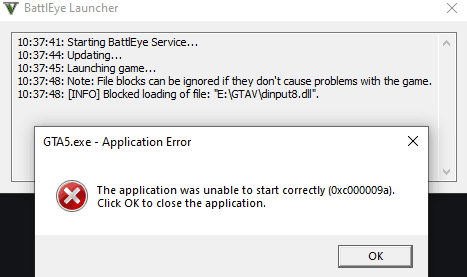
As of September 17, 2024, the game now ships with BattleEye, an anti-cheat software. We can bypass this by adding the -nobattleye launch options.
Steam version, launching the game from the Crowd Control desktop app will automatically apply this.
Epic Games version, you have to manually add the launch option from
Library > Grand Theft Auto V > ••• > Manage.
Known Issues
Some missions may cause the game to close while running the latest version of ScriptHook. You can temporarily uninstall the mod to continue. We have identified these so far:
Credits
Thanks to Alexander Blade for creating the “ScriptHook” mod loader and other GTAV tools, allowing us to create this mod. http://www.dev-c.com/gtav/scripthookv
Ready to get Started?
Start Streaming the Interactive Way
Have any Questions?
Check our FAQs, or join Discord for Support
Making a Game?
Consider integrating Crowd Control!

OTHER SERVICES