
Guide
How Crowd Control Coins Work

Moni
Head of Marketing
Have any Crowd Control Questions?
Our Team is quick to answer!
You already know your viewers can spend Coins on effects like jumpscares, puzzles, and in-game events. But how do Coins actually work behind the scenes? Let's break it down.
Two Types of Coins: Global and Local

Global Coins
Viewers purchase Global Coins on your Interact Link using a credit card or PayPal. Once purchased, these coins can be spent on any creator's Interact Link, not just yours.
Here's how it plays out:
Say a viewer buys 10,000 Coins on your Interact Link, then spends 1,000 Coins (equal to $10 USD) on an effect. Thanks to the 80/20 revenue split, $8 gets added to your Crowd Control payout. Meanwhile, that viewer still has 9,000 Coins left to spend on any creator's Interact Link.
You can track your payout details on the Analytics Overview page. Once you hit the $50 threshold, earnings are paid out 30 days after the end of the current month.
Local Coins
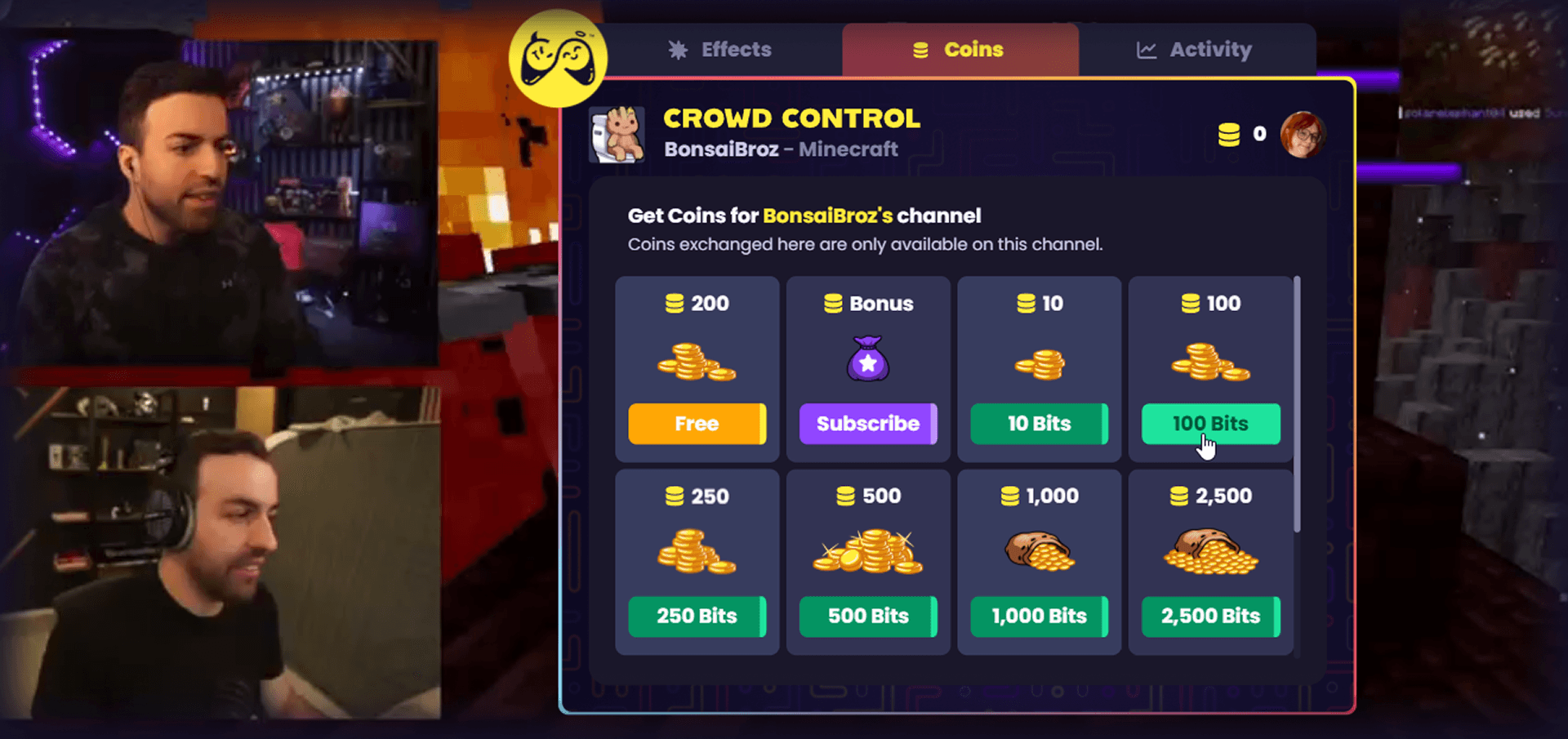
Local Coins, like those obtained by exchanging Bits through the Crowd Control Twitch Extension, can only be used on your channel.
Since Bits are purchased through Twitch first, viewers typically spend slightly more to get the same amount of Coins. Twitch Extension revenue also follows an 80/20 split and gets included in your Twitch payout.
Bonus Local Coins
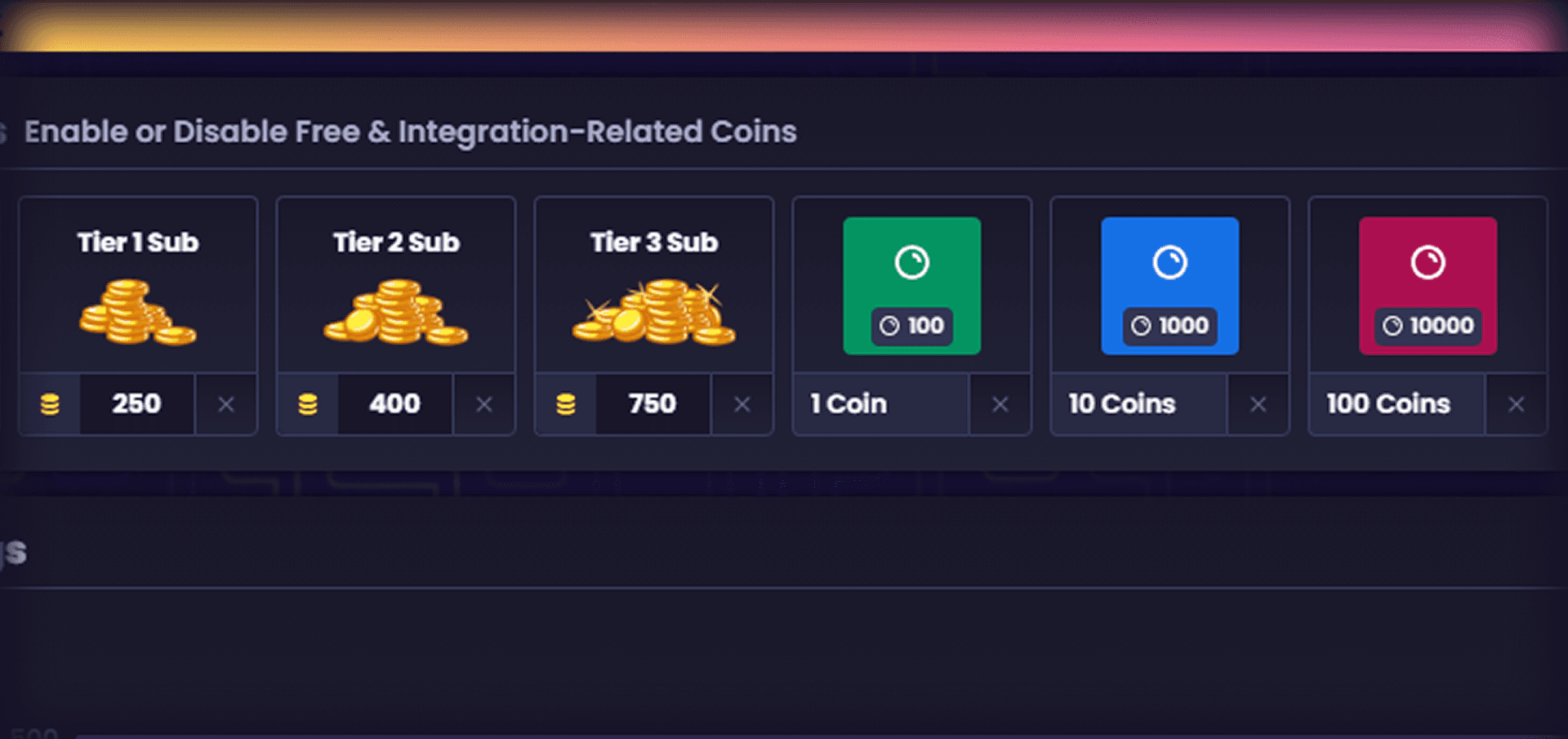
Bonus Coins are a free way to reward your community and let new viewers try things out.
By default, viewers get 50 Free Coins per session, increasing up to 250 on a timer with Crowd Control Pro.
You can also:
Convert Twitch Channel Points into Coins
Reward subscribers with a monthly coin allowance
Manage all of this from the Coins page in the app.
Beyond the Basics
Coins power more than just spending. A few features built on top of the coin system:
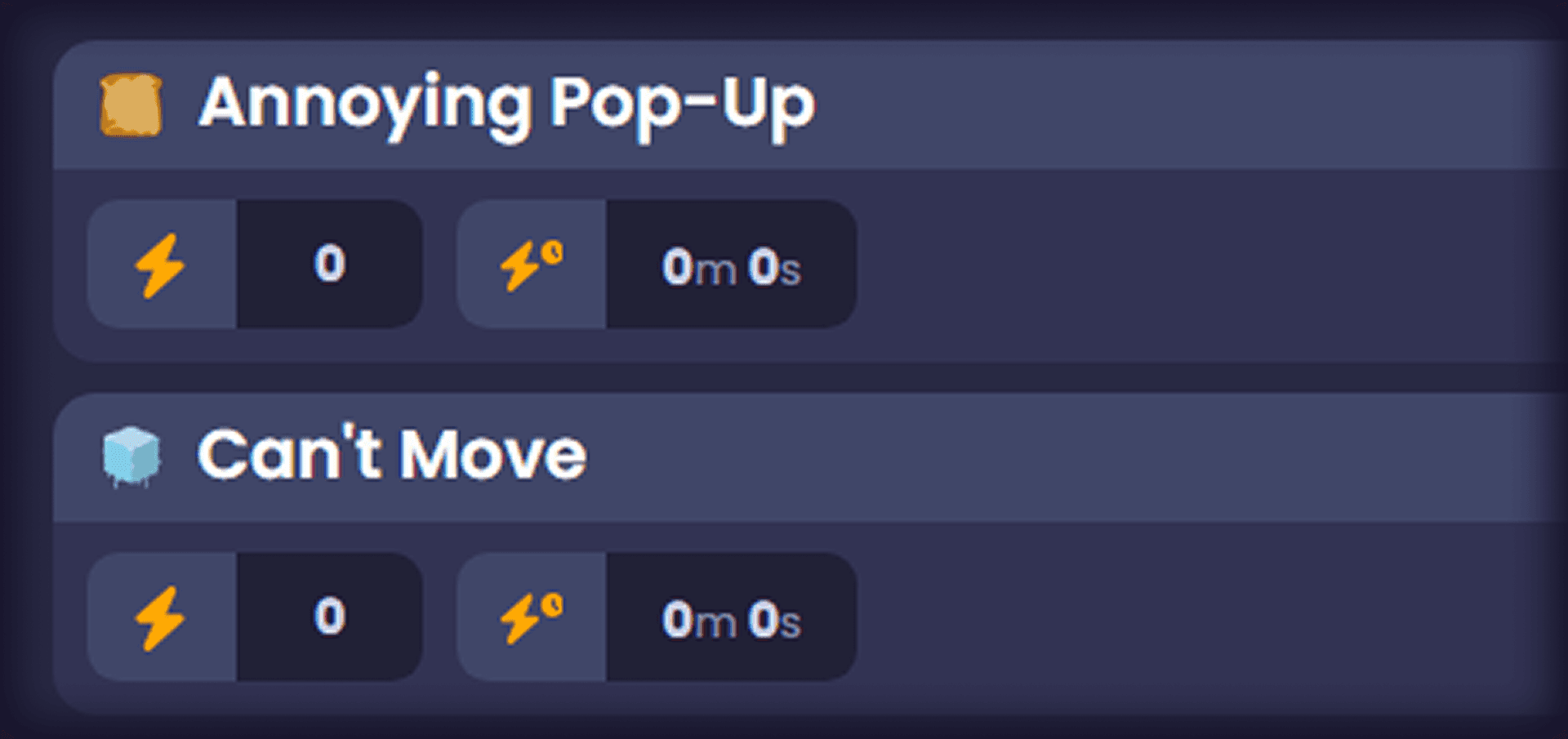
For high-impact effects that can get repetitive (like teleport effects that lock you in one spot), price scaling automatically increases the cost with each use, then cools back down over time. Not all effects have this enabled by default, reach out on Discord if you'd like it set up for your effects.
Chat can pool coins together to afford bigger effects. Everyone can see the pool grow in real time, and if the effect doesn't trigger or the session ends, coins are automatically refunded.
If an effect doesn't trigger, refunds happen in two ways:
Auto refunds: If an effect sits in queue for about 5 minutes without triggering, it's automatically refunded
Manual refunds: Streamers can manually refund or retry an effect, useful if something didn't land quite right

Charity Integration
Crowd Control connects directly with charities through Tiltify, converting donations straight into coins. This has helped raise hundreds of thousands of dollars across dozens of charities at events like Awesome Games Done Quick.
Questions?
That's the rundown on how Crowd Control Coins work. If you've got questions, reach out to the Crowd Control Support Team on our Community Discord Server.
You already know your viewers can spend Coins on effects like jumpscares, puzzles, and in-game events. But how do Coins actually work behind the scenes? Let's break it down.
Two Types of Coins: Global and Local
Global Coins
Viewers purchase Global Coins on your Interact Link using a credit card or PayPal. Once purchased, these coins can be spent on any creator's Interact Link, not just yours.
Here's how it plays out:
Say a viewer buys 10,000 Coins on your Interact Link, then spends 1,000 Coins (equal to $10 USD) on an effect. Thanks to the 80/20 revenue split, $8 gets added to your Crowd Control payout. Meanwhile, that viewer still has 9,000 Coins left to spend on any creator's Interact Link.
You can track your payout details on the Analytics Overview page. Once you hit the $50 threshold, earnings are paid out 30 days after the end of the current month.
Local Coins
Local Coins, like those obtained by exchanging Bits through the Crowd Control Twitch Extension, can only be used on your channel.
Since Bits are purchased through Twitch first, viewers typically spend slightly more to get the same amount of Coins. Twitch Extension revenue also follows an 80/20 split and gets included in your Twitch payout.
Bonus Local Coins
Bonus Coins are a free way to reward your community and let new viewers try things out.
By default, viewers get 50 Free Coins per session, increasing up to 250 on a timer with Crowd Control Pro.
You can also:
Convert Twitch Channel Points into Coins
Reward subscribers with a monthly coin allowance
Manage all of this from the Coins page in the app.
Beyond the Basics
Coins power more than just spending. A few features built on top of the coin system:
For high-impact effects that can get repetitive (like teleport effects that lock you in one spot), price scaling automatically increases the cost with each use, then cools back down over time. Not all effects have this enabled by default, reach out on Discord if you'd like it set up for your effects.
Chat can pool coins together to afford bigger effects. Everyone can see the pool grow in real time, and if the effect doesn't trigger or the session ends, coins are automatically refunded.
If an effect doesn't trigger, refunds happen in two ways:
Auto refunds: If an effect sits in queue for about 5 minutes without triggering, it's automatically refunded
Manual refunds: Streamers can manually refund or retry an effect, useful if something didn't land quite right
Charity Integration
Crowd Control connects directly with charities through Tiltify, converting donations straight into coins. This has helped raise hundreds of thousands of dollars across dozens of charities at events like Awesome Games Done Quick.
Questions?
That's the rundown on how Crowd Control Coins work. If you've got questions, reach out to the Crowd Control Support Team on our Community Discord Server.
" width="14.000000116459887px"><path d="M 3.269 0 C 5.075 0 6.538 1.464 6.538 3.269 C 6.538 5.075 5.075 6.538 3.269 6.538 C 1.464 6.538 0 5.075 0 3.269 C 0 1.464 1.464 0 3.269 0 Z M 2.177 2.015 C 2.114 1.989 2.039 1.958 1.98 2.003 C 1.95 2.024 1.928 2.054 1.906 2.082 L 1.902 2.087 C 1.866 2.135 1.825 2.183 1.778 2.22 C 1.67 2.31 1.536 2.354 1.394 2.361 L 1.392 2.361 C 1.368 2.362 1.343 2.365 1.319 2.37 C 1.23 2.388 1.208 2.456 1.192 2.54 C 1.189 2.554 1.186 2.569 1.183 2.583 C 1.171 2.636 1.158 2.695 1.173 2.74 C 1.204 2.832 1.372 2.822 1.477 2.815 L 1.49 2.814 C 1.502 2.813 1.513 2.813 1.523 2.812 C 1.608 2.806 1.673 2.823 1.718 2.901 C 1.939 3.363 2.222 3.801 2.607 4.159 C 2.624 4.174 2.642 4.189 2.661 4.201 C 2.686 4.216 2.714 4.224 2.74 4.22 C 2.791 4.21 2.827 4.17 2.86 4.132 L 2.863 4.129 C 2.869 4.123 2.875 4.116 2.881 4.11 C 2.887 4.102 2.894 4.095 2.901 4.087 C 2.937 4.047 2.977 4.002 2.98 3.95 C 2.982 3.911 2.961 3.878 2.936 3.849 C 2.76 3.667 2.59 3.477 2.449 3.269 C 2.324 3.082 2.208 2.89 2.134 2.68 C 2.125 2.646 2.121 2.611 2.129 2.576 C 2.14 2.526 2.173 2.485 2.206 2.444 L 2.219 2.427 C 2.258 2.379 2.294 2.329 2.325 2.276 C 2.348 2.236 2.372 2.188 2.36 2.142 L 2.36 2.141 C 2.343 2.084 2.276 2.056 2.22 2.033 C 2.207 2.028 2.194 2.023 2.183 2.018 Z M 5.468 2.642 C 5.442 2.639 5.413 2.638 5.388 2.646 L 5.304 2.726 C 5.199 2.935 5.028 3.05 4.795 3.067 C 4.766 3.071 4.736 3.077 4.712 3.093 L 4.711 3.093 C 4.661 3.126 4.649 3.195 4.638 3.258 L 4.637 3.261 C 4.634 3.277 4.631 3.293 4.628 3.308 C 4.623 3.331 4.619 3.354 4.614 3.377 L 4.612 3.389 L 4.611 3.393 C 4.601 3.444 4.591 3.494 4.582 3.541 C 4.578 3.566 4.574 3.591 4.578 3.616 C 4.583 3.656 4.614 3.681 4.653 3.691 C 5.086 3.76 5.545 3.534 5.788 3.176 C 5.845 3.092 5.976 2.864 5.935 2.768 C 5.915 2.726 5.858 2.715 5.811 2.706 C 5.801 2.704 5.791 2.703 5.782 2.701 C 5.746 2.694 5.708 2.687 5.67 2.679 C 5.603 2.666 5.536 2.653 5.468 2.642 Z M 3.146 1.105 C 3.094 1.1 3.037 1.095 2.997 1.131 C 2.978 1.151 2.968 1.181 2.963 1.214 C 2.912 1.824 2.997 2.394 3.257 2.859 C 3.284 2.901 3.327 2.926 3.377 2.911 C 3.406 2.903 3.432 2.889 3.458 2.875 C 3.46 2.873 3.463 2.872 3.465 2.87 C 3.522 2.839 3.582 2.805 3.64 2.772 L 3.69 2.744 C 3.699 2.739 3.708 2.733 3.718 2.728 C 3.764 2.702 3.814 2.674 3.826 2.621 L 3.826 2.621 C 3.831 2.598 3.826 2.573 3.818 2.55 C 3.663 2.204 3.583 1.819 3.604 1.38 C 3.604 1.366 3.604 1.352 3.605 1.337 C 3.608 1.284 3.61 1.227 3.584 1.185 C 3.559 1.148 3.512 1.138 3.471 1.133 C 3.407 1.127 3.343 1.121 3.279 1.116 C 3.246 1.113 3.214 1.111 3.182 1.108 C 3.17 1.107 3.158 1.106 3.146 1.105 Z M 5.376 2.65 C 5.375 2.651 5.373 2.652 5.371 2.653 L 5.375 2.651 Z" fill="rgb(234, 61, 106)" height="6.538250575370619px" id="EHOHSwCqJ" transform="translate(0 2.239)" width="6.538250568278272px"/><path d="M 1.24 0.899 C 1.24 1.156 1.293 1.399 1.388 1.621 C 1.393 1.632 1.392 1.645 1.387 1.655 C 1.381 1.666 1.371 1.673 1.359 1.676 C 0.828 1.772 0.334 2.051 0.109 2.209 C 0.099 2.216 0.086 2.218 0.074 2.214 C 0.062 2.209 0.053 2.199 0.05 2.187 C 0.011 2.025 -0.005 1.859 0.001 1.692 C 0.034 0.858 0.627 0.179 1.404 0.001 C 1.435 -0.006 1.46 0.028 1.445 0.057 C 1.31 0.317 1.239 0.606 1.24 0.899 Z" fill="rgb(234, 61, 106)" height="2.215802804588664px" id="f7GQHGnLg" transform="translate(1.053 0)" width="1.4492800256519736px"/><path d="M 3.269 0 C 5.075 0 6.538 1.464 6.538 3.269 C 6.538 5.075 5.075 6.538 3.269 6.538 C 1.464 6.538 0 5.075 0 3.269 C 0 1.464 1.464 0 3.269 0 Z M 3.833 2.887 C 3.802 2.893 3.77 2.91 3.739 2.928 L 3.738 2.928 C 3.712 2.943 3.685 2.958 3.659 2.974 C 3.584 3.017 3.535 3.06 3.545 3.153 C 3.547 3.171 3.549 3.188 3.552 3.205 C 3.556 3.235 3.56 3.264 3.561 3.294 C 3.576 3.688 3.118 3.935 2.798 3.698 C 2.782 3.687 2.767 3.676 2.753 3.663 C 2.723 3.638 2.692 3.613 2.654 3.602 L 2.654 3.602 C 2.603 3.589 2.553 3.613 2.508 3.638 C 2.479 3.654 2.45 3.671 2.421 3.688 L 2.416 3.691 C 2.369 3.719 2.311 3.755 2.317 3.817 C 2.326 3.903 2.445 4.004 2.511 4.056 C 3.221 4.598 4.209 3.929 3.989 3.071 L 3.988 3.068 C 3.967 2.991 3.934 2.87 3.833 2.887 Z M 2.32 2.836 C 1.907 2.311 1.071 2.37 0.732 2.945 C 0.594 3.177 0.552 3.467 0.629 3.727 C 0.661 3.828 0.696 3.934 0.823 3.878 C 0.863 3.86 0.901 3.837 0.939 3.815 C 0.957 3.805 0.974 3.794 0.992 3.784 C 1.092 3.727 1.15 3.692 1.133 3.57 C 1.123 3.491 1.117 3.412 1.14 3.335 L 1.14 3.334 C 1.21 3.068 1.528 2.928 1.769 3.06 C 1.8 3.075 1.828 3.097 1.856 3.118 C 1.88 3.136 1.905 3.155 1.93 3.169 C 1.962 3.186 1.997 3.187 2.032 3.175 C 2.066 3.163 2.099 3.145 2.13 3.127 L 2.137 3.123 L 2.174 3.102 C 2.211 3.081 2.247 3.061 2.282 3.039 C 2.371 2.985 2.385 2.921 2.32 2.836 Z M 4.579 1.271 C 4.366 1.119 4.092 1.055 3.834 1.102 C 3.639 1.138 3.459 1.234 3.32 1.376 C 3.085 1.613 2.983 1.975 3.064 2.3 L 3.068 2.314 C 3.087 2.383 3.115 2.482 3.18 2.503 C 3.226 2.514 3.276 2.488 3.317 2.465 L 3.318 2.465 L 3.325 2.461 C 3.372 2.435 3.418 2.408 3.465 2.381 C 3.505 2.357 3.549 2.33 3.568 2.286 C 3.586 2.25 3.582 2.207 3.577 2.168 L 3.577 2.167 C 3.542 1.976 3.62 1.777 3.791 1.681 L 3.792 1.68 C 3.952 1.585 4.164 1.612 4.305 1.733 L 4.308 1.736 L 4.312 1.739 C 4.322 1.746 4.332 1.755 4.343 1.762 C 4.363 1.776 4.383 1.787 4.406 1.792 C 4.458 1.804 4.51 1.776 4.554 1.752 L 4.568 1.744 C 4.62 1.715 4.671 1.685 4.721 1.654 C 4.766 1.628 4.815 1.589 4.804 1.531 C 4.787 1.439 4.652 1.325 4.579 1.271 Z" fill="rgb(255, 236, 59)" height="6.538250573381028px" id="PKYXAbHzG" transform="translate(7.462 2.195)" width="6.538250562779467px"/><path d="M 0.265 0.872 C 0.616 1.141 1.117 1.29 1.565 1.282 C 1.786 1.273 2.031 1.231 2.155 1.035 C 2.224 0.923 2.221 0.783 2.162 0.667 C 1.92 0.235 1.222 0.021 0.75 0.001 C 0.52 -0.005 0.254 0.018 0.091 0.194 C -0.108 0.426 0.052 0.707 0.264 0.871 L 0.265 0.872 Z M 0.679 0.361 C 1.004 0.364 1.377 0.467 1.659 0.649 C 1.705 0.678 1.898 0.817 1.828 0.868 C 1.775 0.914 1.549 0.931 1.396 0.915 C 1.152 0.893 0.915 0.827 0.696 0.718 C 0.566 0.654 0.339 0.504 0.363 0.437 C 0.399 0.372 0.607 0.361 0.678 0.361 L 0.679 0.361 L 0.679 0.361 Z" fill="rgb(255, 236, 59)" height="1.2826122415748673px" id="SRezIcBjl" transform="translate(10.929 0.483)" width="2.2065572669175775px"/></g></svg>)
Crowd Control lets your viewers send effects like interactive puzzles, jumpscares, and even in-game events: no matter where or what you stream.
Link effects to all kinds of actions, including TikTok Gifts, Likes, Shares and Follows, plus Twitch Channel Points, Subs, Raids and more!
Have any Crowd Control Questions?
Our Team is quick to answer!
Ready to get Started?
Start Streaming the Interactive Way
Have any Questions?
Check our FAQs, or join Discord for Support
Making a Game?
Consider integrating Crowd Control!